
UX and simplicity audit
This folder is the user experience and simplicity oversight for Fabric Desktop by KratosBI. It holds the first full audit (October 2026), the scoring method, the backlog of simplification work and the usability gates a pull request passes before release.
| Document | What it holds |
|---|---|
| This page | Executive assessment: overall score, top 10 issues, priorities, and the governance report for product and release management |
| Simplicity scorecard | How each workflow is scored, the scores, and how to re-score |
| Configuration elimination matrix | Every setting and typed input, and whether it should be automatic, optional, advanced-only or mandatory |
| Navigation architecture | The current screen tree, its problems, and the proposed target |
| Workflow optimization matrix | The ten most common workflows: steps, inputs, dialogs and decisions now and proposed |
| Documentation coverage matrix | Each feature mapped to its doc, in-app help link, troubleshooting and limits |
| Backlog and PR specifications | The top 20 simplification opportunities (UX-001 to UX-020), grouped into focused pull requests |
| Usability release gates and PR reviews | The UX review format for the Release Manager, the usability gates, and reviews of open pull requests |
How this audit was done#
- Code: the whole of
app/ui, the shell's commands inapp/src-tauri/src/main.rs, and the engine's sign-in, settings and readiness code, atmaincommit3bee0db. - Running app: the real UI, driven in Chromium with the real Python engine behind it (
app/tests/browser/harness.cjs), at 1440×940, signed out, with no Fabric tenant. Screens that need Fabric data were read from code only. Screenshots are in images/. - Not done: nothing was run on Windows, in the Tauri window, with WAM sign-in or against a live tenant. Findings that depend on those are marked static or unverified.
Every finding names a file and line or a screenshot. Scores follow the rubric in scorecard.md; they are a reviewer's judgment against that rubric, not a measurement.
Executive assessment#
Overall simplicity score: 64 / 100 (significant usability issues).
The parts most people touch first are in reasonable shape. There is no app registration, no Python install, no tenant ID and no workspace ID to type before work starts; a notebook on this PC is two clicks away; SQL on a lakehouse needs no connection setup. The score is pulled down by three things:
- Local-first work has no screens. The local data engine (local projects, files as tables) works, but only through engine calls (local-data.md). The SQL page only opens on a Fabric lakehouse. The product's main promise, work on this PC without capacity, has no visible entry point beyond notebooks.
- Independent features have started to fragment the app. Keys, sources, domains, glossary and platform setup each live in two places (Data mesh and Platform). Monitor has six segments, five in Preview, and two more are in open pull requests. The environment (Dev, Test, Prod) is chosen in five separate places.
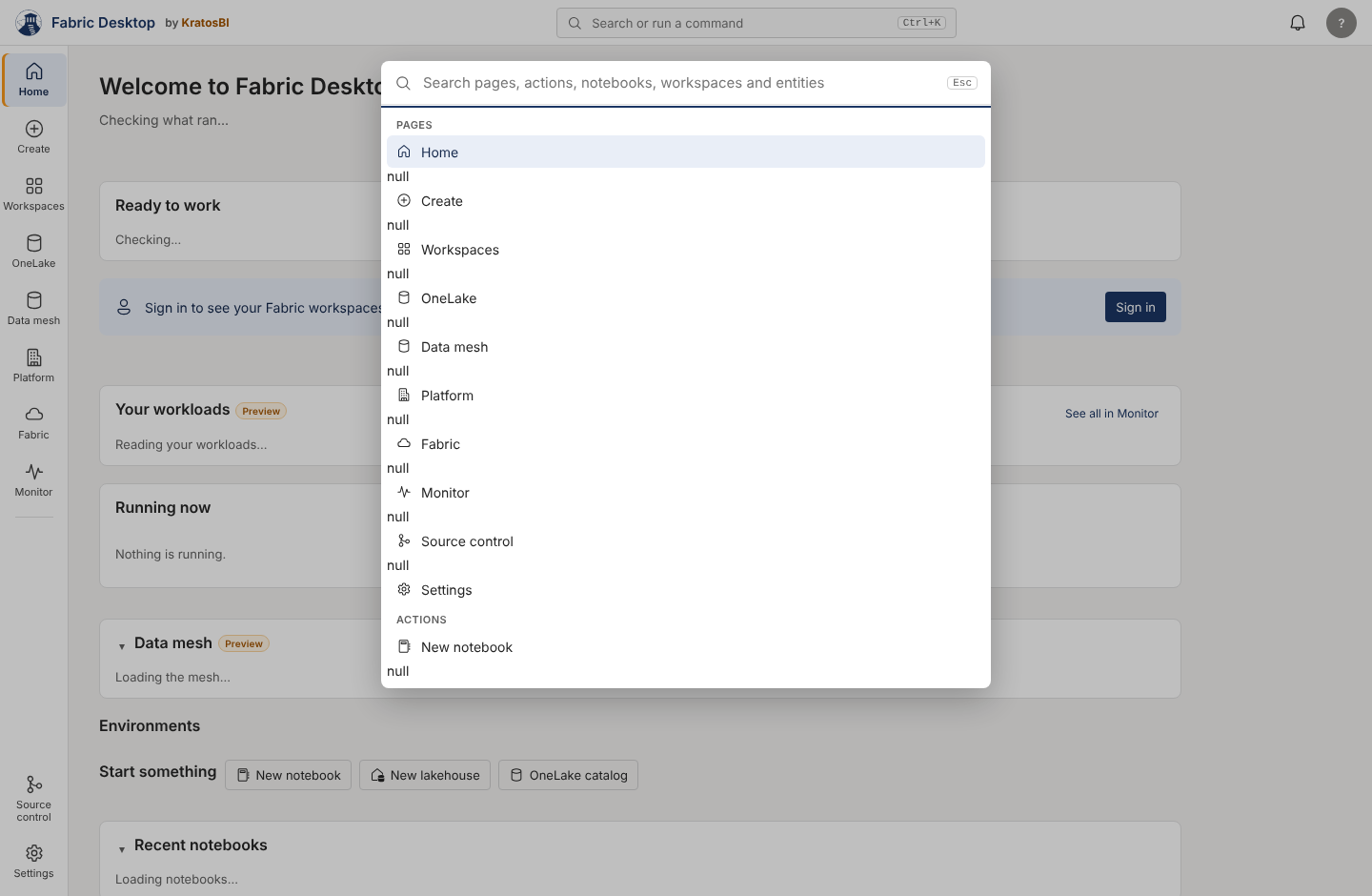
- Small defects everyone meets. The command bar prints
nullbetween every result. Two page help links land at the top of the user guide. A sign-in that needs multi-factor authentication says "Your sign-in expired".
| Workflow | Score | Rating |
|---|---|---|
| W5 Create and run a notebook on this PC | 77 | Needs improvement |
| W3 Query a Fabric lakehouse with SQL | 76 | Needs improvement |
| W2 Sign in and browse workspaces | 71 | Needs improvement |
| W1 Install and first run | 70 | Needs improvement |
| W6 Publish or run a notebook in Fabric | 69 | Significant issues |
| W10 Find a feature | 64 | Significant issues |
| W9 Monitor runs and act on a failure | 63 | Significant issues |
| W8 Promote to Test and Prod | 59 | Major redesign recommended |
| W7 Set up and run a metadata project | 57 | Major redesign recommended |
| W4 Query files on this PC (local-first) | 24 | Not available in the app |
"Major redesign recommended" is the rubric's label for a score under 60. For W7 and W8 the recommendation is focused fixes (one environment picker, pickers for typed paths, plain words), not a redesign. See scorecard.md.
Top 10 usability issues#
| # | Issue | Evidence | Backlog |
|---|---|---|---|
| 1 | No screens for local data projects; SQL works only against a Fabric lakehouse | docs/local-data.md ("the screens for it come next"); no local_query call in app/ui |
UX-004 |
| 2 | The command bar shows null between every result |
images/command-bar-null.png; features.js:129-134 passes null group headers to replaceChildren |
UX-001 |
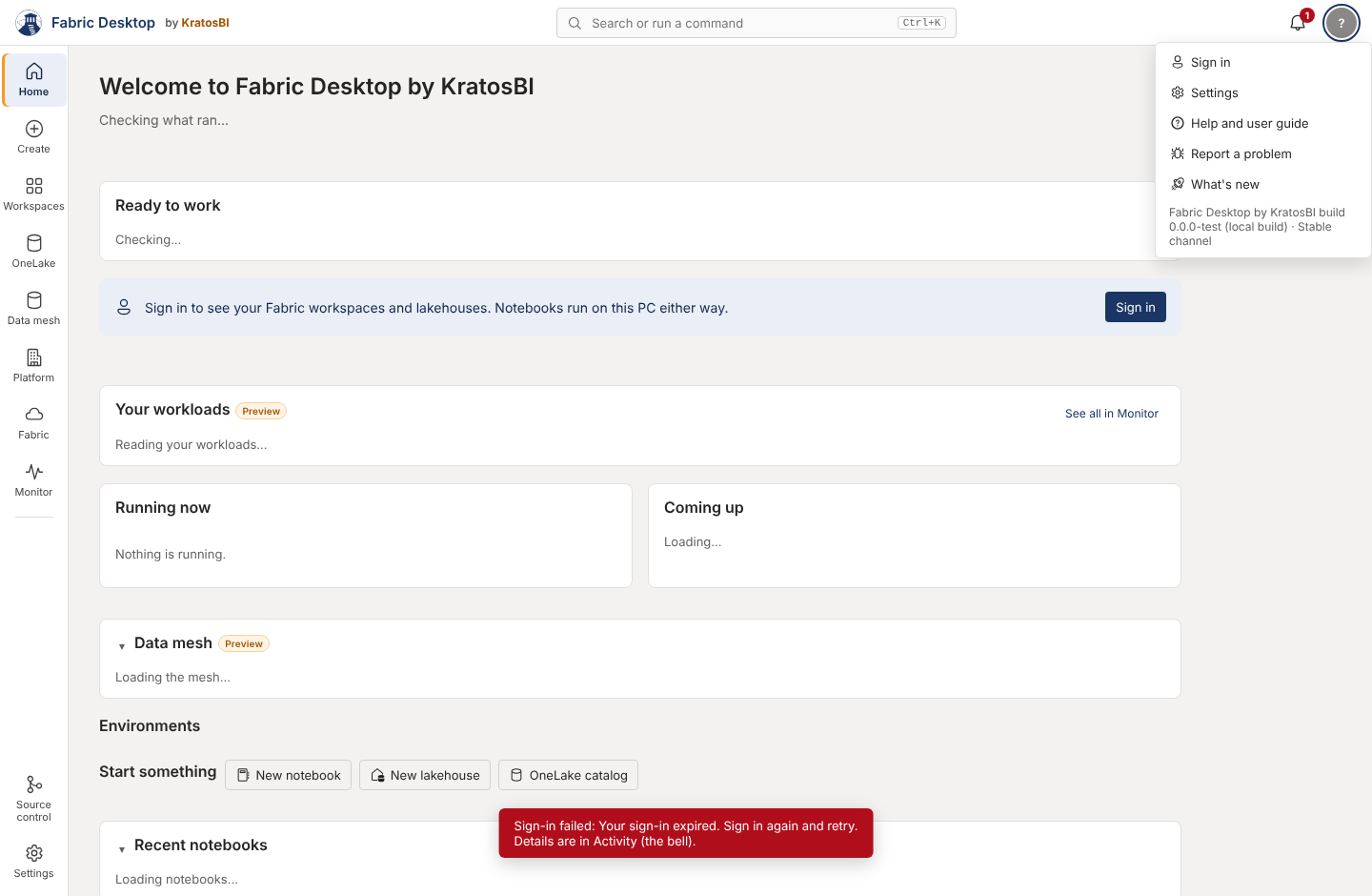
| 3 | Sign-in errors mislead: MFA and other AADSTS codes say "Your sign-in expired"; the text says "Sign-in failed" twice | images/sign-in-mfa-error.png; activity.js:51, auth.py:149, app.js:197 |
UX-003 |
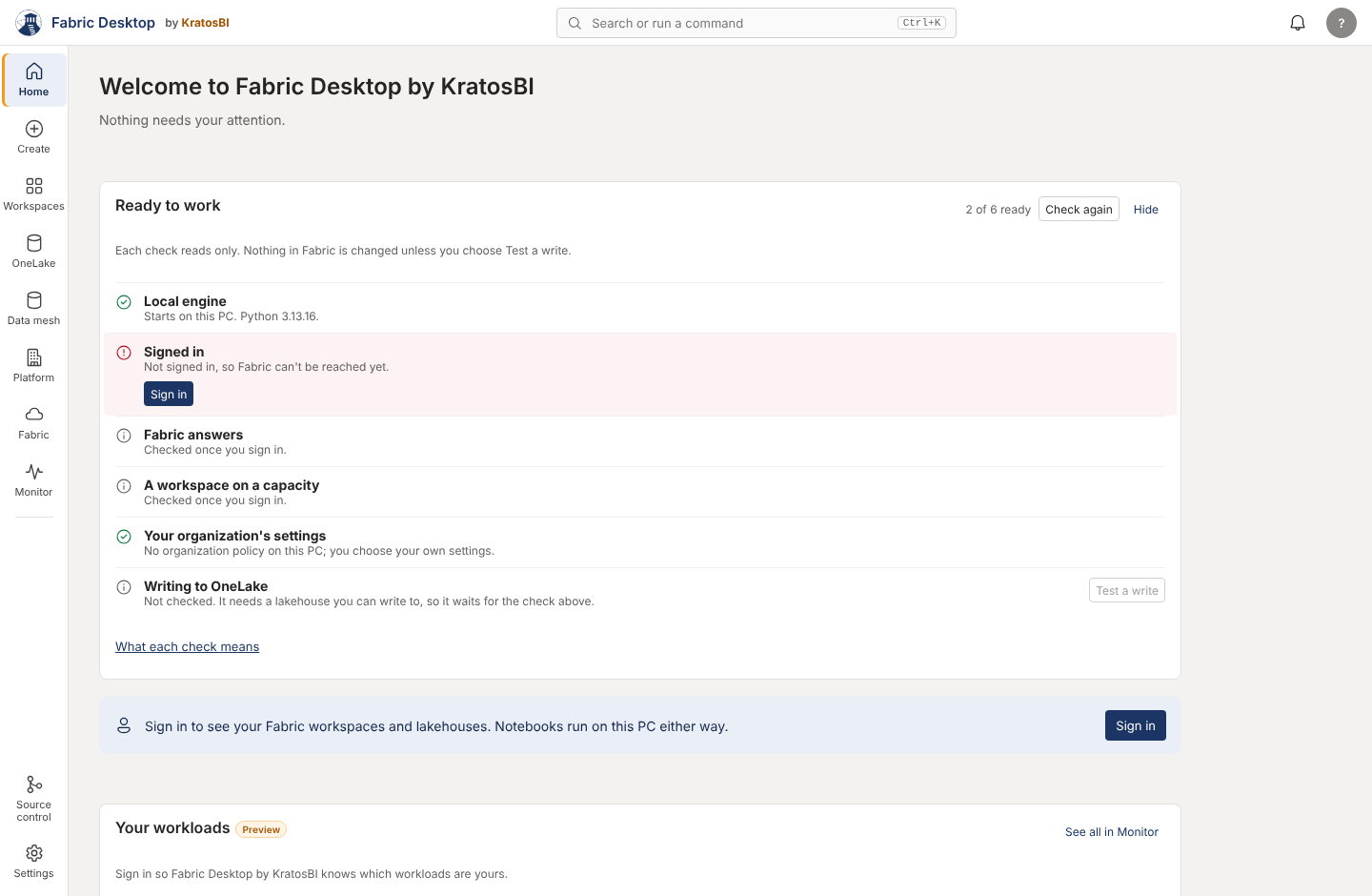
| 4 | First-run Home asks you to sign in three times and shows two setup cards | images/home-first-run.png; app.js:353-370, settings.js:477-540 |
UX-005 |
| 5 | Data mesh and Platform duplicate keys, sources, domains, glossary and setup, with two "New key table" dialogs that write to different stores | meta.js:909 vs platform.js:236; mesh.js:376 vs platform.js:376; settings.js:318 vs platform.js:404 |
UX-009 |
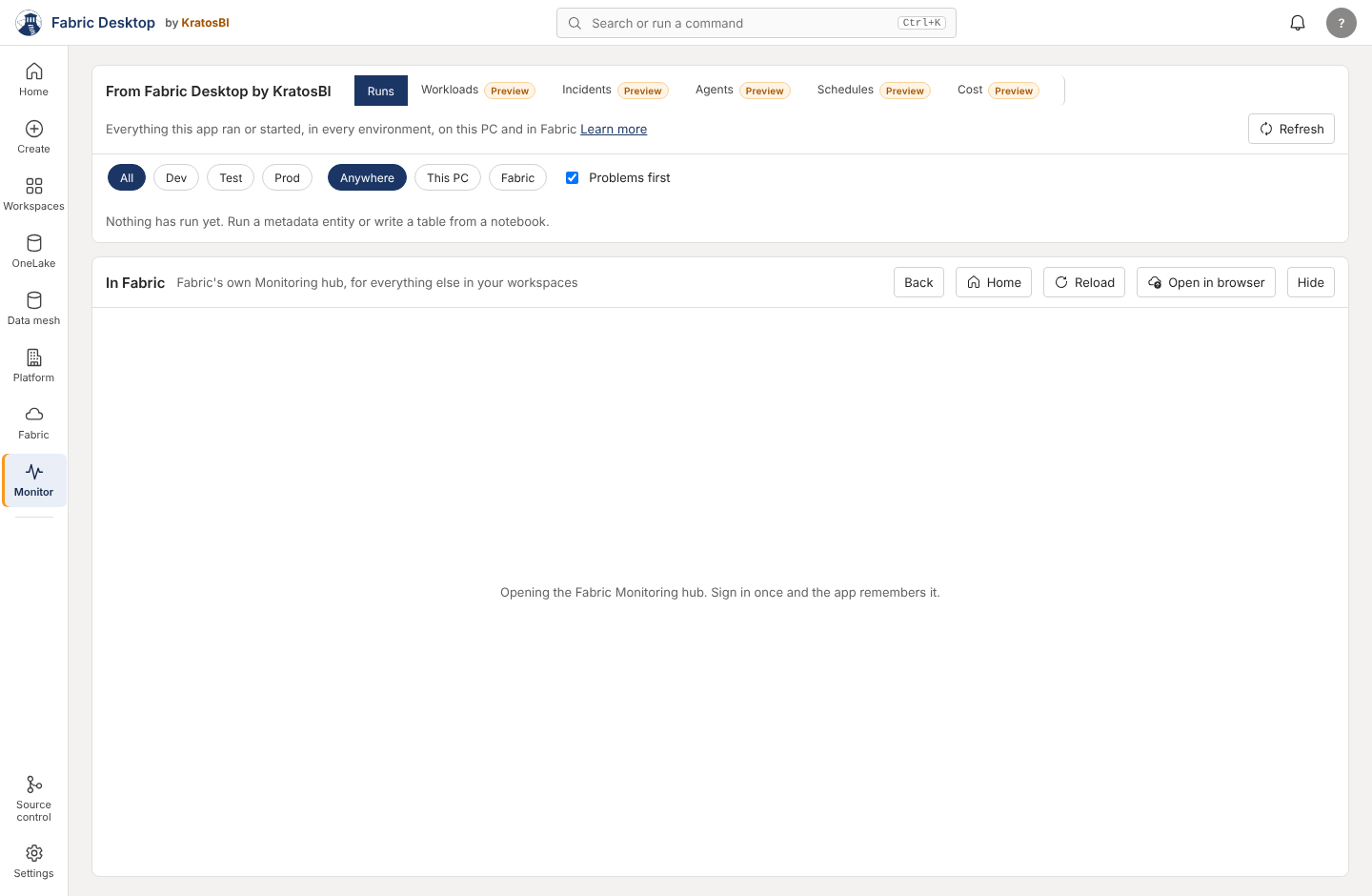
| 6 | Monitor keeps growing: 6 segments today (5 Preview), 8 with open PRs #145 and #163 | images/monitor-segments.png; app.js:536-542 |
UX-010 |
| 7 | No back, no history, and every restart opens Home | app.js:224-228 (go() keeps no stack), app.js:7 |
UX-008 |
| 8 | Raw engine errors shown as the main message in about ten places; toasts have no Retry | app.js:1303,1379,1600, shortcuts.js:240, notebook.js:1134; app.js:57-80 |
UX-011 |
| 9 | Much of the app can't be used by keyboard: clickable rows (11 places), pop-up menus, 13 tab implementations | app.js:172-191 (showMenu), app.js:389,833, meta.js:203 |
UX-012 |
| 10 | Help opens main, not the build you run; 2 header help links are broken; about 15 screens have no help link |
main.rs:961-970; git.js:112, meta.js:114 |
UX-002, UX-007, UX-019 |
Most significant configuration problems#
Full list: configuration.md.
- App (client) ID is the second thing every user sees in Settings, under Account, although almost nobody should touch it (
settings.js:205-216). Saving it does nothing when theFABRIC_DESKTOP_CLIENT_IDenvironment variable is set, yet the app says "Saved" (app_settings.py:205-208). - Raw IDs typed where the app already has a list: workspace IDs for AI tools (
integrations.js:271), connection IDs for shortcut rules (shortcuts.js:363), a group's object ID for access (estate.js:443), the governance table targetcrm:silver.customer(governance.js:335). - Every folder is a typed path. The metadata project folder, Git open, start and clone, and the SQL temp folder have no folder picker (
meta.js:160,git.js:679-698,settings.js:340). - The policy check calls valid keys invalid. The five integration policy keys are documented and read, but
policy_problems()reports them as "isn't a setting" (app_settings.py:143-145vsintegrations/policy.py:27-35). - Two sign-ins. The app signs in with MSAL; the embedded Fabric pages (Monitor's hub, the Fabric page) sign in again with their own cookies (
main.rs:662-760; Monitor says "Sign in once and the app remembers it").
Most confusing workflows#
- Setting up a metadata project (W7): a typed folder path, then Bronze, Silver and Gold, "save gate",
LH_Keys, "Type 2 dimension" and watermarks before the first run. The rail says Data mesh; the page says "Set up a metadata project". - Promoting to Test and Prod (W8): the environment is chosen in the top bar (only on two pages), on Platform (defaults to Dev), on Monitor, on OneLake and on Incidents, each separately.
- Querying files on this PC (W4): not possible from the app.
Most important navigation improvements#
Details and the target structure: navigation.md. A mockup accompanies the proposal.
- One home per concept: platform-wide things (business keys, landing zone, domains, glossary, policies, platform setup) live only in Platform; Data mesh links to them.
- Monitor gets at most five segments: Runs, Schedules, Operations (Workloads, Queue, Agents, Run as, Incidents), Cost.
- Back and forward, and the app reopens where you left it.
- One environment picker in the top bar, on every page that cares about the environment.
- Create grows into the place for local work: notebooks list, SQL on this PC, local data projects. No new rail item.
Documentation gaps#
Full matrix: documentation-coverage.md.
- Help links always open
mainon GitHub, so Stable users read about unreleased behavior. The published docs site is not used. - Two broken header help links (Source control, Data mesh) and no test that checks any help link the app opens.
- About 15 screens have no help link, including the notebook, the lakehouse, the SQL page, the entity page and Shortcuts.
- The Preview list disagrees between the user guide (17), the docs home (21) and the code (26).
troubleshooting.mdhas nothing for Shortcuts, Platform, Data mesh, Workloads, Incidents, Prove, Side by side, Cost, X-ray, Updates or Item preview.- No keyboard shortcut reference in the app or the docs, though the notebook has more than 20 shortcuts.
Recommended priorities#
- Now (quick wins, shared UI code, low risk): fix the command bar (UX-001) and the broken help links, with a test that checks every help link (UX-002).
- Before the next Stable promote: sign-in error messages (UX-003), first-run Home (UX-005), Settings App ID moved to Advanced (UX-006), versioned help (UX-007).
- Next, with mockups agreed first: navigation consolidation (UX-008, UX-009, UX-010, UX-016) and the local-first screens (UX-004, owned by the local data engine program).
- Continuous: shared components for errors, keyboard access, loading and empty states (UX-011, UX-012, UX-020), applied as features are touched rather than in one large change.
Governance report#
For the Master product management system and Release management threads.
For product management#
- New backlog items UX-001 to UX-020 are in backlog.md, each with priority, owner and dependencies. They should be linked from
docs/product/PRODUCT_BACKLOG.jsonby the product management thread, which owns that file. - UX-004 (local data screens) overlaps PB-099 / FD-LDE-001..020 and should be tracked there. UX-003 and UX-005 overlap the enterprise readiness program's first-run and sign-in work (FD-1xx). UX-013 overlaps the codebase audit (HD-xxx) and the earlier honest review's "RPC mutex has no timeout".
- Recommendation for the product process: a feature is not done until it has a help link that resolves, a Preview tag if untried on a tenant, and a home in the navigation agreed in navigation.md. The automated parts of this are in UX-002 and UX-019.
For release management#
- Usability gates, the UX review format (PASS, CONDITIONAL PASS, FAIL) and the first reviews of open pull requests are in release-review.md. The gates sit alongside the codebase audit's release gates in
docs/hardening/(PR #137); they don't replace them. - No current finding blocks a release on its own. UX-001 (command bar) and UX-003 (sign-in messages) should be fixed before the next Stable promote because every new user meets them on day one.
- Open PRs #145 and #163 add a seventh Monitor segment. They get a CONDITIONAL PASS: fine to merge as Preview, on condition that the Monitor grouping in UX-010 is decided before an eighth segment lands.
Keeping this current#
This is a standing review, not a one-off. When a pull request changes a screen, it gets a UX review in the format in release-review.md. After each merge round the scorecard is re-scored for the workflows that changed, and the table on this page is updated with the date, so the trend shows.
| Date | Main commit | Overall | Notes |
|---|---|---|---|
| 2026-10-18 | 3bee0db |
64 | First audit |
Need a hand?
Find a fix in troubleshooting, or share a reproducible issue with the community.
Get support ↗Improve this guide on GitHub ↗