
Navigation architecture
How Fabric Desktop by KratosBI is organized today, what goes wrong, and a target that keeps what 5,000 people have already learned. The rules in ui-guidelines.md stay: at most 8 rail items, new features become tabs inside existing pages, every page and action registers commands for Ctrl+K, untried features carry a Preview tag.
Current structure (main 3bee0db)#
Clicks are counted from launch, which always opens Home.
- Home (0): Ready to work, sign-in callout, needs your attention, freshness, your workloads, running now and coming up, data mesh map, environments, start something, recent notebooks (8), Estate X-ray
- Create (1): Notebook, Notebook from a template (Preview), Lakehouse
- Workspaces (1): All, Favorites, Pinned. Expand a workspace inline to see every item (2), item preview with Data and Schema (3). Or open the workspace page (2), which lists only lakehouses; lakehouse (3); SQL query (4)
- OneLake (1): Catalog, Data products (Preview), Shortcuts (Preview: All, Health, Access, Changes, Requests), Access (Preview)
- Data mesh (1), or "Set up a metadata project" when there is none. Five groups and 13 segments:
- Design: Entities, Layers, Surrogate keys, Source systems
- Runs: Runs
- Quality: Tests, Table health (Preview)
- Domains (Preview): Domain and workspaces, Data products, Links, Glossary
- Deploy: Environments and promote, Semantic model (Preview)
- Entity page (2-3): about a dozen cards
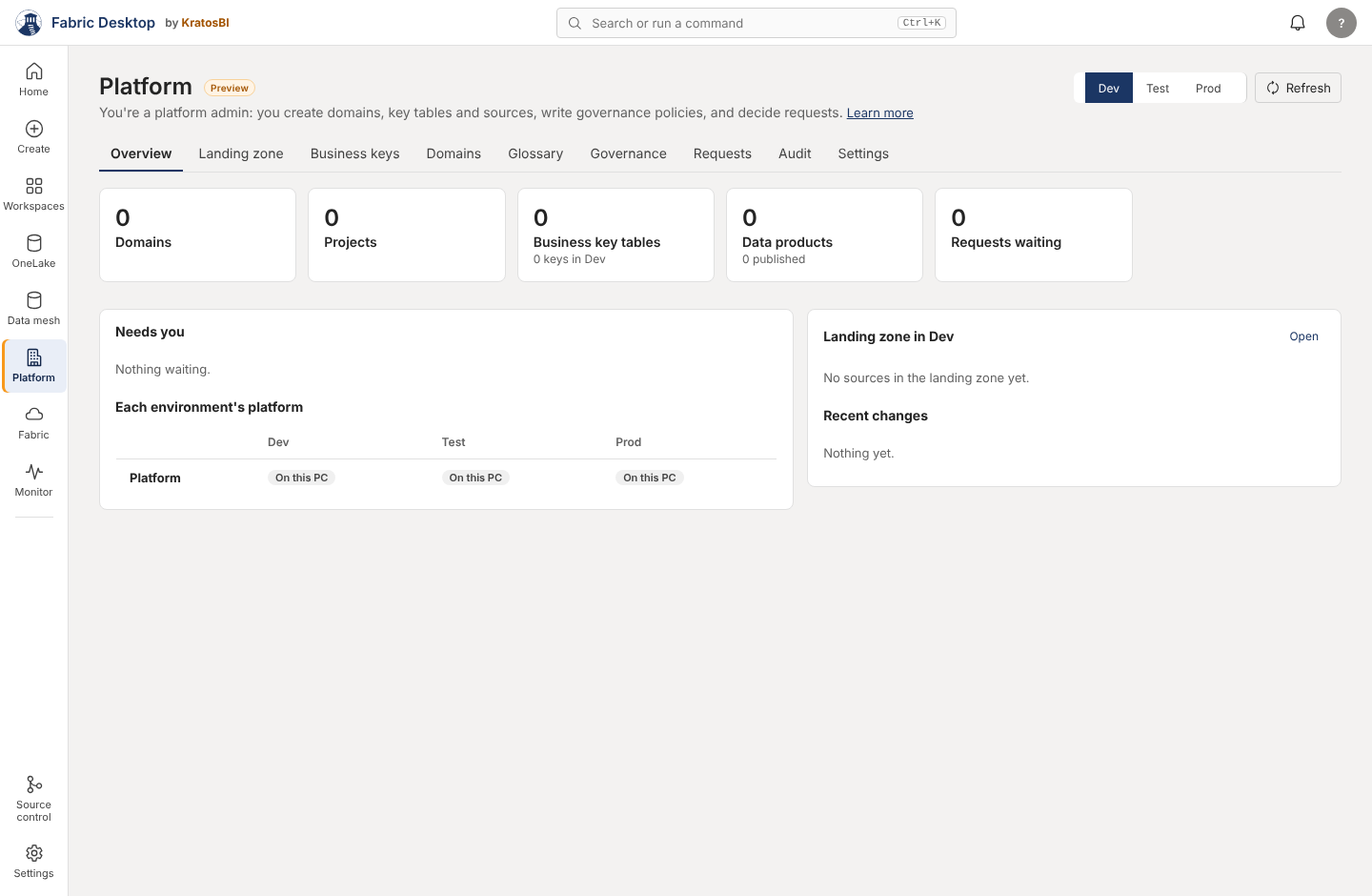
- Platform (1, Preview): Overview, Landing zone, Business keys, Domains, Glossary, Governance, Requests, Audit, Settings
- Fabric (1): the Fabric portal, embedded
- Monitor (1): Runs, Workloads, Incidents, Agents, Schedules, Cost (all but Runs in Preview), with Fabric's Monitoring hub embedded below
- Bottom: Source control (Preview), Settings (General; Integrations, Preview)
- Rail "open" area: one workspace, one SQL query and one notebook
- Top bar: breadcrumb (7 views), command bar, Git pill, environment picker (Data mesh pages only), bell, account menu
What goes wrong#
| # | Problem | Evidence |
|---|---|---|
| N1 | The same thing in two places. Keys (Data mesh > Surrogate keys and Platform > Business keys, with two "New key table" dialogs writing to different stores), sources, domains, glossary, data products, requests, platform setup (Settings and Platform > Settings) | meta.js:909 vs platform.js:236; mesh.js:376 vs platform.js:376; settings.js:318 vs platform.js:404; app.js:937 |
| N2 | Monitor keeps growing. Six segments today, a seventh (Queue) in PRs #145 and #163, an eighth (Run as) being built. Segments mix "what ran" with "who runs it" and "what it cost" | app.js:536-542 |
| N3 | No way back. go() keeps no history, there's no Back, and a restart always opens Home. "Open in Fabric" leaves any page for the Fabric page with no return |
app.js:224-228, app.js:7, app.js:869-878 |
| N4 | Five environment pickers. Top bar (Data mesh pages only, labelled "Data mesh environment"), Platform (defaults to Dev), Monitor, OneLake, Incidents | activity.js:212-226, platform.js:12, app.js:513 |
| N5 | Names that mean two things. Data mesh / metadata / Domains; entity / table; Platform / Fabric side by side; Source control / Source systems; five things called a catalog (one is a dialog titled "OneLake catalog"); "Publish to OneLake" publishes to a workspace | meta.js:94,114,162; app.js:2290; notebook.js:84 |
| N6 | Local work has no home. Notebooks have no list page (only Home's eight recent and Ctrl+K); SQL opens only from a lakehouse; local data projects have no screen | app.js:383; docs/local-data.md |
| N7 | The breadcrumb covers 7 of about 15 views and behaves differently on each. The notebook's workspace crumb isn't clickable; no rail item lights on notebook, incident or agent pages | app.js:261-299, app.js:2402 |
| N8 | A hidden, sticky filter. "Show only items matching" in Ctrl+K filters about 18 lists on every page until the search box is cleared; pages with their own search show two boxes | app.js:2422 |
| N9 | Platform tells a signed-out person "You're a platform admin" when the platform is on this PC only. On a PC-only platform that is probably how the app treats everyone (inferred, not checked), but it reads as a role in Fabric | images/platform-signed-out.png; platform.js:51 |
| N10 | No list of keyboard shortcuts, though the notebook has more than 20 | notebook.js:816-856 |
Target structure#
Focused changes, no new rail items, nothing renamed that people already use except where a name is wrong. A mockup of the changes is attached to the pull request that adds this page.
Rail (unchanged order, 7 main items + 2 bottom; one slot stays free)#
| Rail item | Holds after the change | Change |
|---|---|---|
| Home | Unchanged, with one first-run card instead of three (UX-005) | Content only |
| Create | Today's tiles plus "Your notebooks" (all, searchable), "SQL on this PC" and Local data projects (when built) | Becomes the home for local work (N6, UX-004) |
| Workspaces | Unchanged; the workspace page lists every item type, like the inline expand | Content only |
| OneLake | Catalog, Shortcuts, Access. Data products move to their one home in Data mesh, with a "Data products" filter in the catalog | One fewer tab (N1) |
| Data mesh | Design, Runs, Quality, Domains, Deploy. Business keys, landing zone and glossary are read-only views that link to Platform, where they're managed | No duplicate editing (N1) |
| Platform | Unchanged tabs. Platform setup moves here only (out of Settings). Header says what the role means on a PC-only platform before sign-in | One home for platform-wide things (N1, N9) |
| Fabric | Unchanged | — |
| Monitor | Runs, Schedules, Operations. Operations holds Workloads, Queue, Agents, Run as and Incidents as views in one segment; Cost moved to Optimize > Cost and savings (testing item 36) | Three segments instead of six to eight (N2, UX-010) |
| Source control (bottom) | Unchanged | — |
| Settings (bottom) | General, with Advanced collapsed (App ID, kernel, SQL limits); Integrations | Platform setup leaves (N1, UX-006) |
The free rail slot is kept for a genuinely new kind of work, as the guidelines say. Local data projects don't need it: they are local work, which belongs in Create.
Global#
- Back and forward buttons at the left of the top bar, with Alt+Left and Alt+Right. History holds the view and its tab (UX-008).
- Reopen where you left off: the last view and tab are saved and restored on start.
- One environment picker in the top bar, shown on every page that has an environment (Data mesh, Platform, Monitor, OneLake catalog, Incidents); each page reads the same value (UX-016).
- A breadcrumb on every view below the rail level, each crumb clickable, built from the same history.
- The page filter shows as a chip on the page ("Filtered: sales ×"), and clears when you leave the page.
- Keyboard shortcuts list in the account menu and the command bar ("Keyboard shortcuts"), generated from the same table the handlers use.
Where new and planned features go#
| Feature | Goes in | Not |
|---|---|---|
| Local data projects (FD-LDE) | Create > Local data; SQL page gets a "This PC" target | A new rail item |
| Queue, Run as (workloads 5C, 9A) | Monitor > Operations | New Monitor segments |
| Failure replay bundles (Prove) | Notebook > Prove panel; Activity tray link | — |
| Rollback a release | Data mesh > Deploy | — |
| Measured usage import (FINOPS-003) | Optimize > Cost and savings | — |
| Pipeline definitions (ORCH) | Create (open a pipeline) and Workspaces item preview | A new rail item |
| Governance policies | Platform > Governance (already) | — |
| Fabric workspace Git (Git phase 2) | Source control | — |
Naming decisions to make once#
| Today | Proposed | Why |
|---|---|---|
| "Set up a metadata project", "Metadata version", "Metadata run" | "Set up a data mesh project", "Project version", "Data mesh run" | The rail says Data mesh (Chris's rename); the page should match |
| Surrogate keys / Business keys / key table | Business keys everywhere; "key table" in text | One name for one system |
| "Publish to OneLake" (notebook) | "Publish to Fabric" | It creates a notebook in a workspace |
| OneLake catalog (dialog title for Add data items) | "Add data" | Five catalogs is four too many |
| "Spark SQL runs on this PC" / "Queries run with DuckDB" | "Spark SQL, run on this PC by DuckDB" | One sentence, both facts |
How a new feature finds its place#
- Find the person's task in the table above. Put the feature in that page as a tab, a view inside a tab, a card or an action.
- If it would be a new Monitor segment, a new Platform tab past the current nine, or a new rail item, it needs a UX review and a mockup first.
- Register its commands, its help link and its Preview flag in the same PR.
Need a hand?
Find a fix in troubleshooting, or share a reproducible issue with the community.
Get support ↗Improve this guide on GitHub ↗