
Engineering & roadmap
Workflow optimization matrix
A new name. The same foundation. KratosForge is the upcoming name for Fabric Desktop by KratosBI. These guides preserve the app’s current labels and paths.
The ten workflows people do most, counted on main 3bee0db. A step is a click, key press or wait the person must make; typing the actual work (code, SQL, a name) isn't counted. Inputs are mandatory values the person types or chooses. Decisions are choices the app could have made. Counts come from the code paths named and, where marked, the running UI; nothing was run against a live tenant.
Summary#
| Workflow | Steps now | Steps proposed | Inputs now → proposed | Dialogs now → proposed | Unneeded decisions now | Score now |
|---|---|---|---|---|---|---|
| W1 Install and first run | 6 + 1-2 outside the app | 4 | 0 → 0 | 1 (startup check) → 1 when needed | 1 (three sign-in prompts) | 70 |
| W2 Sign in and browse workspaces | 3 (+1 for embedded Fabric pages) | 2 | 0 → 0 | 1 (Microsoft) | 0 | 71 |
| W3 Query a lakehouse with SQL | 4 | 3 | 0 → 0 | 0 | 0 | 76 |
| W4 Query files on this PC | Not possible in the app | 4 | — → 1 (folder, picked) | — → 1 | — | 24 |
| W5 Notebook on this PC | 3 | 2 | 0 → 0 | 0 | 0 | 77 |
| W6 Publish or run in Fabric | 3-4 | 2-3 | 1 (workspace) → 0 when known | 1 → 0-1 | 0 | 69 |
| W7 Metadata project to first run | 6 + typed path | 5 | 1 typed path → 1 picked | 0-1 | 1 (layer preset shown before anything else) | 57 |
| W8 Promote to Test or Prod | 5-7 | 4 | 1-2 workspaces (first time) | 2-3 | 1 (choose environment again) | 59 |
| W9 Act on a failed run | 3-5 | 2-3 | 0 | 1 | 1 (which Runs page) | 63 |
| W10 Find a feature | 2-5 | 2-3 | 0 | 0 | 0 | 64 |
Details#
W1 Install and first run#
| Now | Proposed | |
|---|---|---|
| Steps | Download; SmartScreen "More info > Run anyway"; on many PCs, turn off Smart App Control in Windows Security (outside the app); wait for the engine (1-2 minutes); Home; Sign in | Download; run; wait with progress; Home with one "Sign in or work on this PC" card |
| Screens | Startup dialog (only when slow or failing), Home with Ready to work, sign-in callout and Get started | Startup dialog, Home with one card |
| Waits | First view waits on Python and a network release check before anything shows (app.js:2619-2622, static: up to about 10 seconds offline) |
Home skeleton at once; update check alongside |
| Knowledge needed | Smart App Control, SmartScreen | None once code signing is in place |
| Failure paths | Good: Python too old, engine blocked, update failed, each with Retry (app.js:2463-2617). One contradiction: "Install Python 3.11" shown even though release builds bundle it (app.js:2503) |
Keep; show developer-only advice only in developer builds |
| Improvement | — | 2 fewer steps, 2 fewer cards, no outside steps once signed |
W2 Sign in and browse workspaces#
| Now | Proposed | |
|---|---|---|
| Steps | Sign in (Home, Workspaces callout, Ready to work or avatar); Microsoft or WAM prompt; Workspaces | Same, from one place |
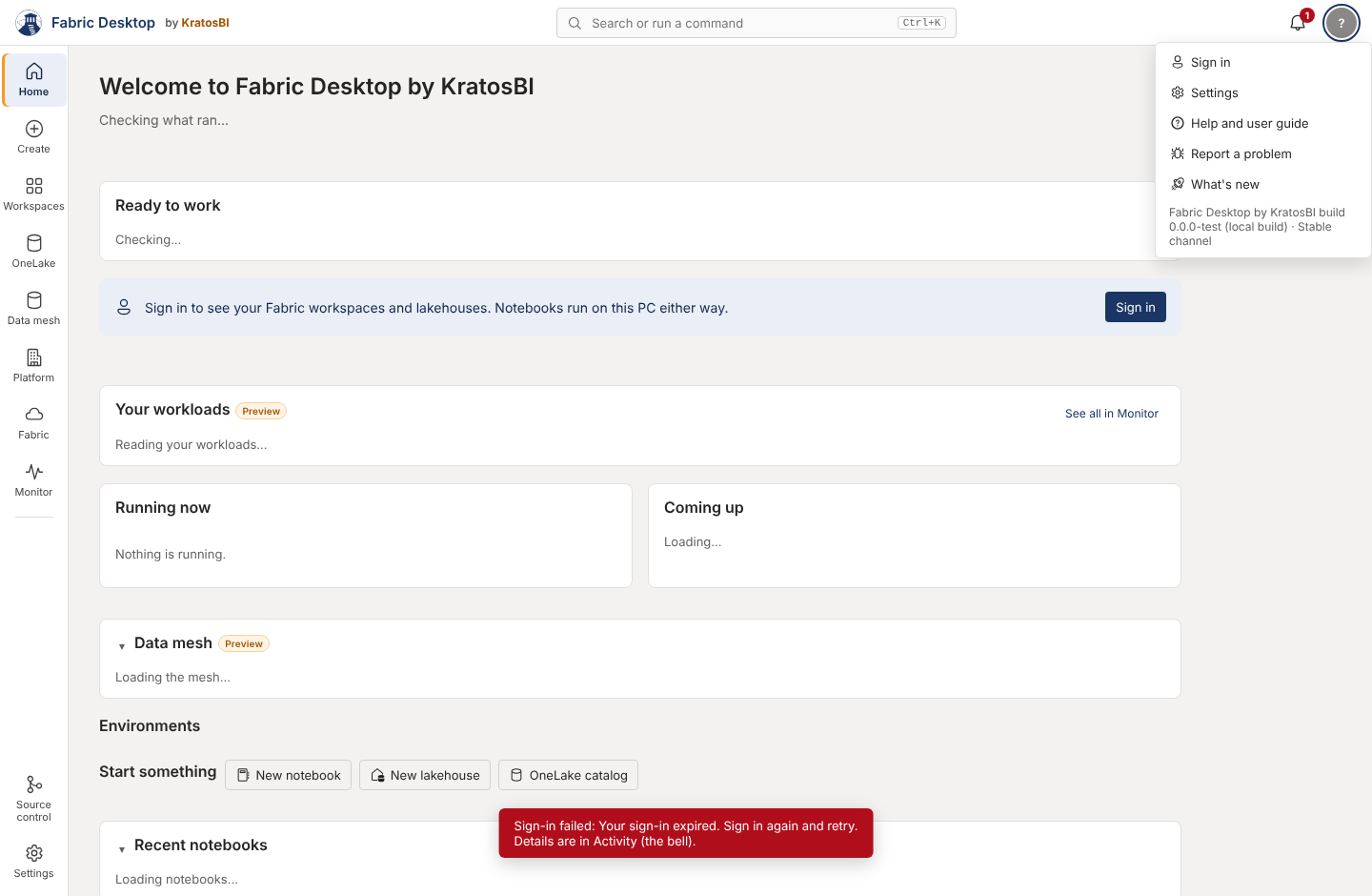
| Extra | Monitor's Fabric hub and the Fabric page sign in again in their own web view ("Sign in once and the app remembers it") | One sign-in if the embedded view can take a login hint (to investigate) |
| Failure paths | MFA required, wrong tenant, cancel: all say "Your sign-in expired" or "Sign-in failed: Sign-in failed: …" (images/sign-in-mfa-error.png; activity.js:51, auth.py:149) |
Each Entra code mapped to a sentence; cancel is not an error (UX-003) |
| Gaps | One account only (auth.py:136); no tenant choice for guests |
Account switcher in the account menu |
W3 Query a Fabric lakehouse with SQL#
| Now | Proposed | |
|---|---|---|
| Steps | Workspaces → expand workspace → lakehouse row "SQL query" → write → Ctrl+Enter | Ctrl+K "New SQL query" → pick lakehouse (recent first) → write → Ctrl+Enter |
| Inputs | None: the lakehouse is the connection | Same |
| Gaps | No "New SQL query" command; no help link on the page; raw errors in the grid (app.js:1303); the hint and the toolbar disagree on Spark SQL vs DuckDB |
Command, help link, friendly errors, one sentence |
W4 Query files on this PC (local-first)#
| Now | Proposed (owned by the local data engine program) | |
|---|---|---|
| Steps | Not possible from the UI. The engine's local_* calls work (docs/local-data.md) |
Create → Local data → Add folder (picker) → tables listed → New SQL query on "This PC" |
| Inputs | — | One folder, picked |
| Improvement | — | Makes the product's core promise visible |
W5 Create and run a notebook on this PC#
| Now | Proposed | |
|---|---|---|
| Steps | Create → Notebook → write → Shift+Enter | Ctrl+K "New notebook" (exists) or Create → Notebook; same |
| Finding it again | Home shows 8 recent; otherwise Ctrl+K by name | Create lists all notebooks with search |
| Gaps | No rail item lights on the notebook; no help link; kernel errors show a log tail (notebook.js:1134) |
Rail lights Create; help link; friendly kernel error with details |
W6 Publish or run a notebook in Fabric (Preview)#
| Now | Proposed | |
|---|---|---|
| Steps | Publish to OneLake → pick workspace (first time) → done; Run in Fabric via the Runs on menu | Same, labelled "Publish to Fabric"; workspace remembered per notebook (already) |
| Gaps | The label says OneLake but it creates an item in a workspace; the Publish options menu can't be used by keyboard (app.js:172-191) |
Rename; keyboard menu |
W7 Set up and run a metadata project#
| Now | Proposed | |
|---|---|---|
| Steps | Data mesh → type or accept folder → pick 2/3/5 layers → Create project → Entities → Run all | Same with a folder picker and the sample pre-selected; the default path already works |
| Inputs | Folder path (typed; default offered) | Folder (picker) |
| Knowledge needed | Bronze, Silver, Gold, LH_Keys, LH_Meta, save gate, Type 1/2 dimensions, watermark, quarantine |
Plain words with the technical term in a tooltip (UX-017) |
| Gaps | Rail says Data mesh, page says metadata project; TOML editor traps Tab (meta.js:324); entity source and key columns typed |
Match names; Esc then Tab leaves the editor; column pickers |
W8 Promote to Test or Prod#
| Now | Proposed | |
|---|---|---|
| Steps | Data mesh → Deploy → Environments and promote → pick workspace for Test (first time, list) → Compare → Promote → confirm | Top-bar environment picker → Deploy → Promote with comparison shown in the same dialog |
| Decisions | The environment is chosen again on Platform (defaults to Dev), Monitor, OneLake and Incidents | One app-wide environment (UX-016) |
| Safety | Compare before promote and tests gate promote exist; keep every confirmation | Keep; add typed confirmation for Prod (UX-018) |
W9 Monitor runs and act on a failure#
| Now | Proposed | |
|---|---|---|
| Steps | Bell or Home → Monitor → Runs → open run → act | Bell → the run, with "Run again" and "Open entity" |
| Gaps | Home says "Nothing needs your attention" when run history fails to load (app.js:411-412); Fabric job tracking stops after one failed poll (activity.js:167-170); runs in Monitor and Data mesh > Runs; detail pages have their own Back buttons |
Say when history couldn't be read, with Retry; poll with backoff; one Runs page with a project filter |
W10 Find a feature#
| Now | Proposed | |
|---|---|---|
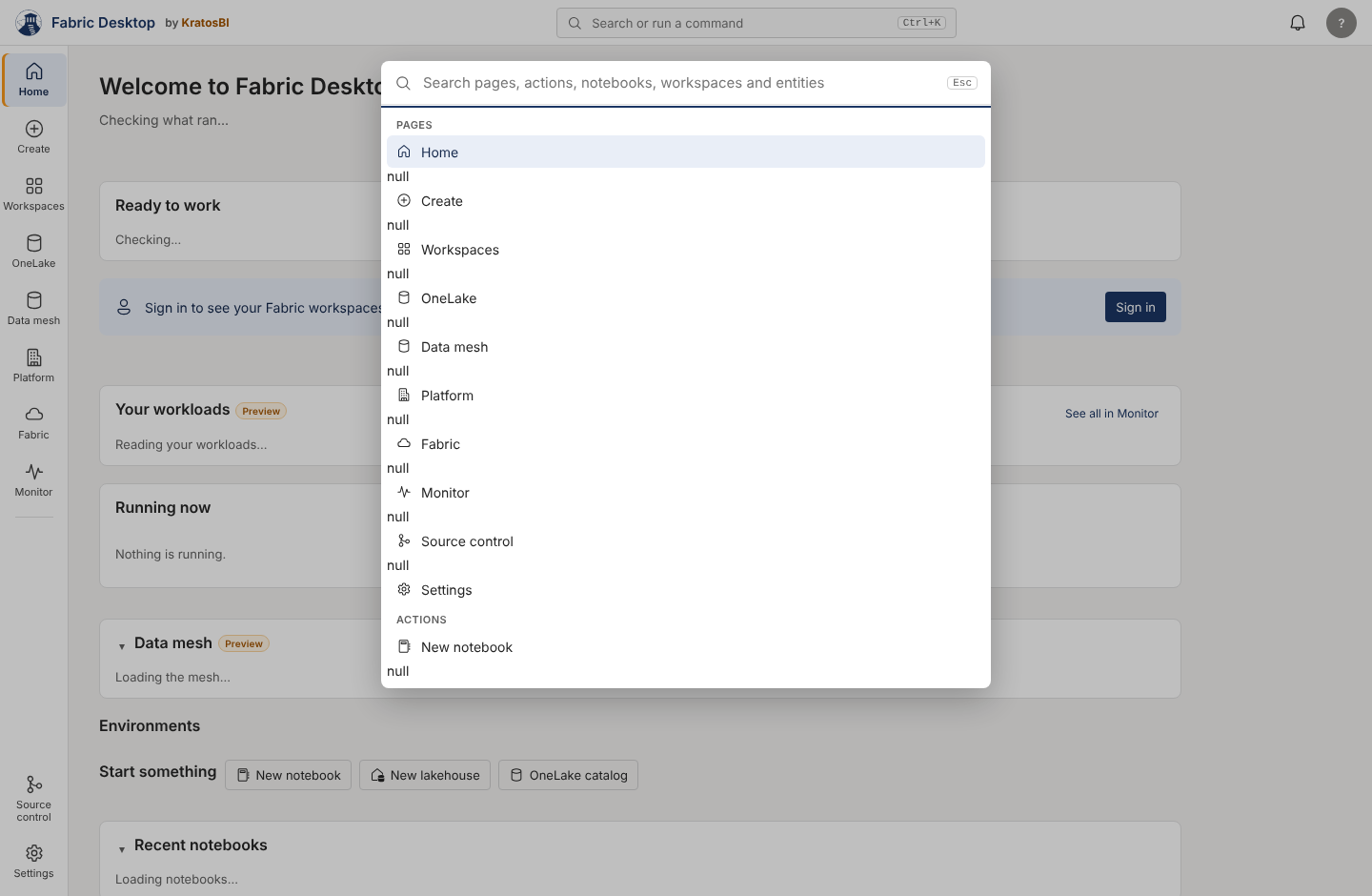
| Steps | Ctrl+K, type, Enter (2-3), or browse the rail and tab groups (2-5) | Same, with no null rows; Back returns |
| Gaps | null between every command bar result (images/command-bar-null.png); no Platform Domains, Glossary or Audit commands; two "Runs"; no shortcut list |
UX-001, commands for every tab, a shortcut list |
Not traded away#
Fewer clicks never removes a confirmation that protects OneLake data, an authorization check, or the compare-before-promote step. Where a proposal removes a step, it is a step the app could answer itself.
Need a hand?
Find a fix in troubleshooting, or share a reproducible issue with the community.
Get support ↗Improve this guide on GitHub ↗